

Getting a document validated by multiple people can quickly become time-consuming: emails piling up, duplicate files, wrong versions, forgotten approvals…
A document validation workflow simplifies this process by automatically organizing the different steps and clearly indicating to everyone what they need to do.
With a solution like myWorkplaceCloud, our Digital Workplace, documents and validation processes can be centralized in a single work environment.
What is a document validation workflow ?
A workflow defines the journey of a document between the various collaborators involved.
A typical workflow can follow this path :
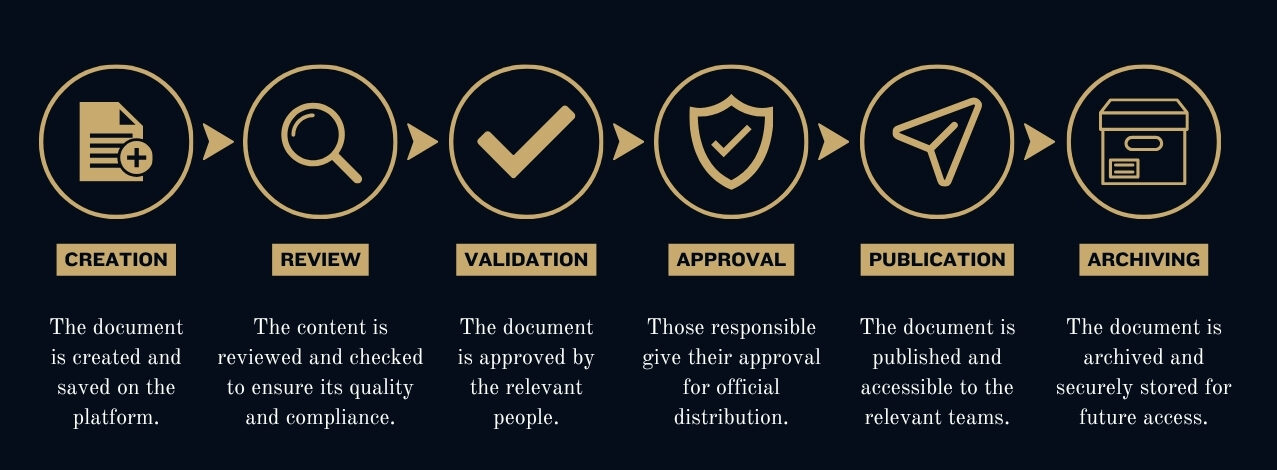
At each step, the document is transmitted to the right person. Notifications can also be triggered to prevent oversights and manual follow-ups.
The process thus becomes smoother and, above all, easier to track.
A concrete example of a document workflow
Let’s take a new internal procedure.
The collaborator creates the document and uploads it to the document space in myWorkplaceCloud.
The manager receives a notification and performs the review. They can then validate the document or request modifications.
Once corrected, the document is transmitted to the manager responsible for final approval.
After validation, the final version can be published to the relevant collaborators and archived with its history.
The entire document journey is thus centralized, tracked, and traced.
The advantages of a workflow for your company
Implementing a document workflow notably allows you to:
- ⏱️ save time on repetitive tasks;
- 📄 avoid version errors;
- 🔎 quickly know the status of a document;
- 🔔 automate notifications and reminders;
- 🔐 better control access to information;
- 📋 maintain an action history;
- 🤝 facilitate collaboration between teams.
Everyone thus knows what to do, when to intervene, and where to find the right document.
myWorkplaceCloud : a Digital Workplace to centralize your processes
With myWorkplaceCloud, collaborators have a single digital workspace to find their information, documents, tasks, and communications.
Document management can be combined with collaborative features and internal processes to limit the proliferation of tools.
Document validation, HR requests, purchases, invoices, quality procedures, or internal requests: workflows can be adapted to the needs of each organization.
The objective is simple: to make digital technology a true facilitator of daily work.
Simplify before automating
A good workflow must first and foremost remain simple.
Before digitizing a process, it is important to identify the truly necessary steps, the people involved, and any potential blocking points.
The objective is not to reproduce a complex process, but to simplify it through digital technology.
Would you like to digitize your workflows ?
Our agency supports companies in their Digital Workplace, document management, workflow, and process automation projects.
With myWorkplaceCloud, we help you centralize your tools and create processes adapted to your teams.