

Frequently Asked Questions
Who are the "Microsoft", "Google" and "Liberty" editions?
Do you already use tools like Microsoft 365 or Google Workspace? Consolidate their use with a platform that integrates them seamlessly and allows you to capitalize on these tools with new features. For example, you will be able to access your emails, calendar or online documents via MyWorkplace. If you do not have or do not want to integrate with Microsoft or Google, you can choose a Liberty version of MyWorkplace and integrate third-party tools for office automation, email, etc., if you wish.
How many members can I put on my platform?
You can order up to 10,000 members on the website, but if you need more, you can send an email to contact@myworkplacecloud.com and we will send you a quote.
Est-il possible d’utiliser Microsoft 365 ou Google Workspace avec MyWorkplaceCloud ?
Yes, our MyWorkplaceCloud platform is compatible with a Microsoft 365 or Google Workspace plan. Thanks to this integration, you will be able to read your emails on MyWorkplaceCloud, co-edit documents that are saved either on Microsoft or Google or on MyWorkplaceCloud, use chat and video tools (Meet or Teams) on your Digital Workplace, to view documents stored on your Drive or SharePoint, etc.
Microsoft or Google modules are included in all offers.
What options can I add to my MyWorkplaceCloud platform?
There are many options available to customize your MyWorkplaceCloud platform, integrate it completely with your information system and strategic objectives to develop your business.
For example, you can add native features such as:
– E-learning, knowledge sharing, the creation of learning paths such as on-boarding for example.
– Instant messaging (chat, video call…)
Other features are available through a connector (requiring a third-party service account), for example:
– An electronic document signature system
– the integration of artificial intelligence and assistants
It is also possible to integrate connectors (via API) into your platform to connect it to other business software, for example an HRIS software, a CRM, a PIM etc…
You will be able to completely customize your Digital Workplace and make it a real user cockpit for your employees.
Is it possible to customize the logo and colors of the platform?
Yes, of course, as an intranet dedicated to your company, you will be able to integrate your logo and the colors of your company on your platform. You will also have several default graphic themes allowing you to change the colors in 1 click.
Does the MyWorkplaceCloud solution have native reports and statistics?
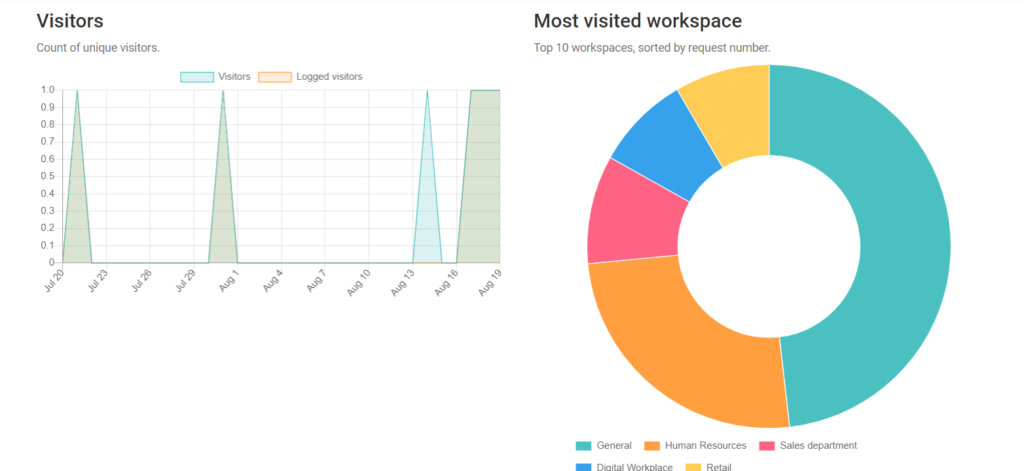
Yes, the platform has reports available to community administrators and leaders on usage. For example, it will be possible to see the number of connections per day, the most published content types, the most active communities, the most used categories, the most liked content…
What does the Takeoff plan contain?
The TAKEOFF offer of MyWorkplaceCloud is designed to help you develop internal communication within your organization and create links between your employees. This offer includes modules and features such as news and events (share information about the company through articles or information on events), thematic and collaborative monitoring (share information on internal or external topics and involve your employees in collaborative monitoring), the media library (give easy access to all images, videos or audio) or quizzes…
Is it a monthly subscription?
Yes, you pay monthly.
Can I change my current subscription?
Yes, you can increase the number of members or the current offer. The change will be available the following month with at least 48 hours’ notice.
Is there a commitment?
Depending on the plan you choose, you can give 14 days’ notice for a monthly subscription or one month’s notice for an annual subscription after the first year.
What can I do if I need more storage space or a specific data backup policy?
Just send an email to contact@myworkplacecloud.com and we will send you a quote
How do I contact support?
Need help using MyWorkplaceCloud? Feel free to contact our support department by email at support@myworkplacecloud.com
When is the service available?
Our support service is available by email 24/7. Our response times are variable, but your ticket will be processed within 6 hours.
Can support help me train my teams?
Of course! With your subscription, you get 1 to 5 days of assistance depending on your offer, which you can use in different ways. For example, you can organize video training sessions for your team.
Where is my data hosted?
For the platforms of Australian customers, the data is hosted in Australia at AWS (Amazon).
For clients’ platforms in the French-speaking Pacific, the data is hosted in Europe at OVH CLOUD.
How is MyWorkplaceCloud data saved?
Data is backed up every 24 hours.
Who has access to my data?
The members you integrate into your platform have access to your data, depending on the rights granted to them and the areas they belong to. A member will only see data from zones of which it is a member. For technical reasons and to facilitate support, Vittoria.io has an administrator for each MyWorkplaceCloud instance. The administrator accesses technical data and content according to the client’s needs. In any case, the administrator of Vittoria.io is subject to a confidentiality clause.
Is the platform responsive?
Your MyWorkplaceCloud instance is accessible on the web, from a desktop computer, tablet or smartphone. A mobile application (iOS and Android) is also available for easy smartphone navigation.
Adapted SSO? LDAP to the authentication server? Keycloack server or protocol 0auth2?
It is possible to integrate, on MyWorkplaceCloud, an SSO environment (Single Sign On), using OAuth 2.0 and thus allow the user to log in only once to a service. You can also use OpenID Connect on a Keycloack server. We can also use the SAML 2.0 standard, which allows us to interface MyWorkplaceCloud with all major market identity management solutions that support the SAMLv2 protocol.
What type of electronic signature is possible?
Electronic signature is possible via several online solutions such as Docusign, YouSign or UniverSign. MyWorkplaceCloud initiates (triggers) the signature request based on documents stored on the platform. The signature process is then managed by the third-party solution, and it is therefore this one that will guide the type of electronic signature. MyWorkplaceCloud allows you to track the status of the signature and at the end of the process, and to retrieve signed documents on the platform. It is possible to limit access to the electronic signature to a group of people only.
How to launch an e-learning? Is it possible to upload a SCORM file?
MyWorkplaceCloud offers a module related to e-learning to facilitate continuous learning and the transmission of knowledge in an organization. With this module, it is possible to create knowledge and import a SCORM file into it. Avec ce module, il est possible de créer des connaissances et d’y importer un fichier SCORM. All knowledge is grouped in the knowledge catalog, accessible via the ‘formation’ app in the application launcher.
Is it possible to interface with Exchange?
Microsoft Exchange interfaces with the MyWorkplaceCloud platform and we report all content. The co-editing of documents is done through Microsoft tools (Word, Excel, etc…) by being directly interfaced with MyWorkplaceCloud and document management.
How can we strengthen the security of our application?
An action can be triggered on an API when a workflow changes state (or arrives at a specific state) with specific development. Indeed, this is not natively supported by the solution.